Showing posts with label help. Show all posts

Wednesday, December 18, 2013

Where should I host my Voice Over Demo? Can I upload it to Facebook?

I've gotten this question a couple times from friends and colleagues, and I've never had a great answer for folks.

From my pal Curtis:
Hey Juan, Do you know how I can upload my vo demo to my fb profile? Or is it best to link from another page to fb?
So here's the deal Curtis, we've never had great solutions for hosting audio online. You'd think in a world of streaming HD video, there's be SOME place we could semi-permanently host high quality streaming audio files like Youtube.

Recently, services like SoundCloud have become popular, and their bandwidth caps aren't horrible if you're focusing on something like your demos. The nice thing about SoundCloud is that it not only offers a handy place to upload the demo, and tools to embed the audio file on other sites, but it also makes it pretty easy to share your demo with a variety or services and social networks.

The tricky thing about directing traffic to web pages and social networking is you'll find people have very little patience. There's about zero attention span online. If someone finds you through Facebook they might not follow you to another link posted on your profile. Vice-versa if someone finds your web site, and you try to ship them off to Facebook or another service.

I'd recommend trying to make sure the basics of what you do are well represented individually on all services you use. If I find you on Facebook, I should be able to easily find your contact info, and listen to your demo, on Facebook. Ditto your own personal site.

But Facebook doesn't allow audio uploads do they? Well this is where all these streaming video sites might actually come in handy. Come up with a static image, a brand logo, something with your name on it, contact info, and convert that demo to a video file where it can live on Youtube, Vimeo, Facebook Video, etc.

Between SoundCloud and streaming video, you should have plenty of options for making sure that your marketing materials are easily accessible regardless of how someone might find you online.

For the rest of my VO audience, what services have you utilized for sharing your demo? Have I missed anything which might help people share high quality audio? Drop me a comment below!

Saturday, April 5, 2008

This is the song that never ends - Beatles Edition

Just like my post about Spacehog, when I get stuck on a song, I REALLY get stuck on it. Obsessive! I'm burning up my ipod on one track right now...

The song du jour is 'You've Got to Hide Your Love Away' from the Beatles movie 'HELP!', and I'm kind of loving it.
I think it's a musical high point of theirs, in terms of simplicity, and is easily, hands down, my favorite Beatles song.

I love that it's not as literal as "Yesterday'.
I love that it's disgustingly vulnerable.
I love that John Lennon pops his p's on "people".
I love that the recording is SUPER raw. It's hissy, and simple. Listen to the song on headphones with your eyes closed. It sounds like there's a guitar ten feet to your left, a tambourine ten feet to your right, John Lennon is about 5 feet in front of you, and at the end a ninja with a flute has snuck up behind you to finish the song off with a solo.

It's gorgeous.

It's kinda sad to think that a song as sweet as this could NEVER be made today...

Help!
someaudioguy some audio guy music beatles voice over help voice acting demo voice casting film


Saturday, March 15, 2008

AudioGuy Mail Bag - Some Audition Questions...

This question comes in from Janet, who has a few technical questions about her auditions:

I love all your Some Audio Guy postings and you've been a big help.
I've done on-camera and voice over work for many years as a radio and TV
anchor/reporter but now am after strictly voice-over work.

Here are my questions -

In my home studio, I can't hear my voice in the headphones while I'm recording
with Audacity or Adobe Soundbooth CS3 - playback is no problem.
(it was set up by a broadcast engineer friend but I never
noticed that I couldn't hear in the headphones when he was
here, or maybe I've done something wrong since.)

Also - if my intention is to supply "dry reads" from my home studio, how much
cleaning up should I do on the auditions? if I take out breaths and normalize
the volume (as you show on your video) is that a false impression of what I
intend to deliver? Isn't that more an "I can deliver edited and finished voice tracks" as voice123 says or do I misunderstand the term "dry read?"

Whew, that's a lots of questions all wrapped into one. I appreciate any help you can give me.

Thanks - Janet


Hey Janet,
About hearing yourself while recording, that can be a little tricky, It's largely going to come down to what sound card you're using to record. Most modern external soundcards should be fast enough to let you monitor. Depending on what recording software you're using, there should be a recording setting to allow hardware monitoring. Now this is where latency comes into play. Your card has to sample the audio you create (vibrations in the air), translate it into a digital signal (1' and 0's), and pass it over a USB or FW cable to your computer, WHILE re-routing it to your headphones. If you dont have a reasonably quick soundcard/computer setup, then you'll hear yourself as an echo with a split second delay.

As for this notion of "dry reads", well I just try to go for simple. Some of the casting studios use dynamic mics plugged directly into a mixer into the mic port on a computer (no soundcard at all). They do this so their recordings aren't good enough to use for an actual spot, but are good enough to hear what the actors are doing. This doesn't seem to negatively affect their business (though I can't say I love the quality of the recordings).
I say, as long as you're being honest about your talents, then do what you're comfortable doing. If you get to the end of an audition, and you have to do a ton of editing to make it sound good, then maybe it's not for you.

I tend to leave breath noise in auditions, except for deep breaths before and after copy (like my big sigh in the video). One they are perfect points to edit around, and two there's an odd psychological trick to long copy. If an audience member hears continuous monologue, but no breathing, it can cause a little distress (like when you see an action movie, and the hero dives underwater for 10 minutes, the audience will try to hold their breath along with said hero).

I think normalizing is fine, as long as it's done subtly (you want your sound balanced nothing too spikey loud or too quiet), though I would avoid heavy compression (audio not MP3 compression). You really don't want a solid WALL of sound. You never know what kind of speakers you'll be played on, so you could sound really muddy or distorted. It's like music mixing, you want to sound the same on crappy car speakers as you do on a $15K home theater. It's not glamorous, but it's a better way to represent yourself.

Thanks for the question (I'll probably steal it for the blog ;-), and thanks for reading!
-SomeAudioGuy
someaudioguy some audio guy mailbag question help how to recording music voice over voice acting auditioning acting actors animation commercial

Wednesday, February 6, 2008

Call for Help! - Mixers: NRV10 vs Zed-14?

All right!
I NEED HELP!

I'm kinda stuck, and some opinions from my faithful readers would be very helpful.

I need a new mixer.

More specifically I'd like to replace both my mixer and my sound card in one fell swoop, so I'm looking at Firewire and USB mixers. I've gone through Alesis, and Mackies, and Phonics, and I think I've got it narrowed down to 2 units in my price range. I'm completely torn, so on to the comparison.

The two I'm stuck on are the M-Audio NRV10 and the Allen & Heath Zed-14. I need four or more phantom powered XLR ports, and individual channels sent to computer. Both units do that, so what's bothering me?

The Allen & Heath (typically about $450) is, well, an Allen & Heath. That already makes it desirable. Six mono inputs, 4 buses, USB interface, and 100mm faders round out an impressive feature set. I've always enjoyed the build quality of A&H, and those extra buses are awesomely flexible.


Next up, the NRV10 (Usually around $700) comes from a company I'm VERY familiar with, having used M-A soundcards for YEARS now. I think I like Firewire better than USB (especially when I have to use my dog tired laptop). The NRV10 has fewer inputs, no alt buses (so less routing flexibility), but each channel has individual send selectors, giving it some good (but not great) channel flexibility. Lastly, while the mixer itself isn't quite as flexible as the A&H, it comes with one powerful advantage for me. It will play with the copy of Pro Tools M-Powered I picked up for my FW410.

So there's the question. Do I go with the more expensive less flexible mixer because it uses PT, or do I go with the more flexible less expensive mixer and use another program (I like Sound Forge and Audition, but I do need PT from time to time)? PLEASE leave me some comments with your thoughts!

I need some help guys!

so...

HELP!

LOL

***EDIT 03/24/08***

I GOT THE NRV10!
You can check out some unboxing pics, and my first impressions here!

Thursday, January 3, 2008

Audacity Development for the Mac - A Call for Help?

Recently I posted on Audacity's update to 1.3.4, well I didn't notice at the time, but that update was for Linux and Windows only (the two OS's I primarily use at home) not OSX. Apparently OSX has STILL not received the update as there are no Mac users working on Audacity anymore.

TUAW links to the Audacity forums, where recently a call for developer help just went out. I was happy to see that it was answered pretty quickly on both the forum AND TUAW. With that I thought I would second the call, help put out the word, as Audacity is a fantastic audio editor, and it's never good to let a platform lag too far behind. To my knowledge it's still the only Open Editor that plays across all three major PC platforms.

I still find it odd though, that with the Mac becoming a more and more attractive solution (thanks Vista), and has always been known as a "creative friendly" platform, that there isn't more development of this kind of software.

I don't normally write about this (I only made it through one semester of CS), but if anyone out there develops for Mac, and has some time to throw in for a GREAT piece of software, I'm sure it would be appreciated!

TUAW

Audacity Forum

Wednesday, January 2, 2008

Super Cheap Condenser or Mid Range Dynamic? MXL 990 vs SM57

I've gotten this question a couple times now:
Should you use a cheap condenser or an established dynamic mic for voice over?

It's a tricky question to answer.
There are pros and cons to each approach, and largely I think it still comes down to budget and experience. This seems a little bit cop out, as ideally we would make audio decisions with our ears alone, but there are several "bang for buck" points that need to be addressed.


Since this question is so tricky to answer, I thought I'd throw down some equipment to see if it helps. I recorded myself on a Marshal MXL 990 and a Shure SM57. The MXL is largely known as one of the cheapest budget condenser mics you can find, often retailing for just under $60. The SM57 is the gold standard of studio dynamic mics, and retails for about $100.
I recorded myself on each, plugged directly into my FW410 at matched gain. I was about 7 inches from the 990, and about 1 inch from the SM57. No editing was done other than to Normalize volume (second batch of recordings), and to mix down to 320Kbps MP3. These are really raw and noisey! Yay!


Which one sounds "better"? Let's take a listen!
Here's my (awful) reading of Shakespeare's Sonnet 17 (Mrs. Audio Guy picked it out for me, woot).

SM57 Raw Output:


MXL990 Raw Output:


OK, so the SM57 is audible, but I can't hear it as well as the 990. To get a better listen at whats going on, let's boost both samples and match the output volume (peak normalized to 90%).

SM57 Normalized:


MXL990 Normalized:


Alright that's better. I think the 990 is a little bright, maybe even a tad harsh, but it definitely sounds clearer and more present than the SM57. Where the SM57 succeeds is in lower noise, higher tolerance for peaking, and a richer tone for vocals, but out of the box (and plugged directly into a Soundcard without any other gear) I'd have to say I'd prefer the sound of the budget condenser.

Would you really use a mic this way though? Well. not really. The SM57 really needs to be driven by a dedicated preamp, so since we're comparing budget gear, I dug up my old Behringer T1953, which at $150, is about as budget as you can get. Plugging the SM57 into this gives us a nice little 20dB gain boost.


SM57 on Preamp:


Now listening to that, I'd much rather use the 57. The tube adds a ton of hiss (which after listening back I should've tried a little harder to clean out...), but I sound richer and fuller.

So what can we conclude?

It all comes down to budget and experience.

*To use a budget condenser, you need a soundcard with Phantom Power (at least $150), to use a dynamic you should really drive the mic with a dedicated preamp (at least $150) into a decent sound card (at least $50).
M-Audio FireWire 410 4-In / 10-Out FireWire Mobile Recording Interface

*Out of the box the condenser will have a slightly lower learning curve (plugging directly into soundcard) and give you slightly clearer recordings, but will sound brighter (or harsher) and thinner. The dynamic will have a slightly steeper learning curve (mic into preamp into soundcard), but will be more tolerant of peaking or clipping, more directional (wont pic up as much room noise), and will probably sound richer.

So I know that's a cop out, but it really will come down to which one you sound better on, versus how much you're able to spend to get there. Hope that helps, and comments/questions always welcome!

Thursday, December 27, 2007

Home Recording Sound Card Wizard

Are you in the market for a sound card?
Don't know which one to get?

Brandon Drury of RecordingReview has you covered!


He's a created a nifty little web app to help buyers decide which sound card to buy.


You can check it out here!

Thursday, December 6, 2007

How to properly pronounce the hard words - HowJSay.com

Man it's all about web apps today I guess, but here's a good one.

When it comes to dissecting copy, I've gotten pretty good at looking up the tough words on sites like dictionary.com. Recently a lot of those site now feature audio pronunciations, which is great, but not all sites have all of their entries voiced yet. Sometimes you have to search out a few sites to actually hear the word you're looking for.
Hard? No.
Kind of a pain? Yeah, a little.

So, trolling Lifehacker, I've found this neat little service called HowJSay. Basically it's a search field for word pronunciations. Handy, easy to use, bookmark it and go. They've currently got over 80,000 words indexed, and I haven't really stumped it yet (except for those really obnoxious pseudo-science words used in cosmetic ads).

CHECK IT OUT HERE

Friday, September 7, 2007

Protecting Your Ears!

Hear that ringing in your ears? That's a frequency of sound you'll never hear ever again, a piece of your ear dying.


Ok I don't know if that's completely true, but it does mean you are doing irreparable harm to one of your most valuable instruments. Whether you're in front of the mic, or behind it, consistent monitoring of what you hear is vital. My top bookers do everything they can to not only protect their voices, but also their hearing (no loud concerts, etc).

It's very frustrating sitting in front of my monitors, and recording newbies that cough and clear their throats into the mic, suddenly spike volume after we've checked levels, or try to adjust their copy stand and end up bashing the mic. These things might not seem like such a big deal to the actor in the booth, BUT THEY ARE ALL AMPLIFIED FOR ME! Working at the agency for almost two years now, I've lost almost a full kHz (high frequency hearing) in each ear, and most likely will never get that back.

Trying to explain that to other people is almost equally frustrating. This is how I plan to make my living, and I'm faced with people that probably crank the volume on the earbuds that came with their ipods. The responses range from ultra-cavalier to a genuine "that sucks", but get them in front of the mic again, and it's the same behavior.

*sigh*

Anywho, this article from Gigacrate is written from a DJ perspective, but is good reading for
anyone that depends on vocals or hearing for their work.

How many times have you left a gig with your ears ringing? Or woke up
the next day worried you may have caused some permanent damage to your
ears? My guess is quite often. It’s no secret that as DJs we are
constantly exposing ourselves to super loud noises for extended periods
of time.
With a little care and precautionary measure, you can lower your risk
of serious hearing loss. After all it’s about the music right? Make
sure when you’re 60 you can still hear it.

READ THE REST HERE!

Friday, August 3, 2007

AUDACITY Tutorials GALORE!

So for newbies trying to record I try to set up the simplest recording environment I can. I tend not to like USB mics, but lately it's been hard to deny how much less intimidating the simplicity of ONE cable to the computer is.
However, once that is out of the way what to do with the audio entering the computer?

I really like Audacity for beginners. It's not very pretty, but it's pretty easy to learn, and well ... you know ... the price is, uh, pretty good. I charge quite a bit for setup and instruction, but often I find that the client really just needed a little advice, not a full blown instructional session.

So not to undercut my own business, but if you're one of those just needing a little push, I found this great little tutorial on Youtube.


Also, if you want more advanced Audacity goodness, you can go here.

Enjoy!

Sunday, July 29, 2007

HELP! Replacement Shock Mount Bands?

Ok,
This is REALLY starting to drive me crazy. I've looked everywhere I can think to look, but I can't find replacement shockmount bands for EITHER my M-Audio solaris mount or my AT8410a.

Am I going to have to resort to hair ties and rubber bands?

Any help out there would be greatly appreciated!

***UPDATE 4/18/08***
Looking into this as a possible solution:
How to Silence Your Hard Drive

someaudioguy some audio guy voice over vo voiceover recording demo production microphones audio engineer equipment

Sunday, July 22, 2007

Moving Audio Again

Man I just can't find stable free hosting. I'm SO cheap...

So I started with Podomatic, and I'll probably keep them until I'm full there (that's the nifty player at the bottom of my page, but they wont do individual files just my ENTIRE podcast table of contents - ALL OF IT).

Then to get nifty players I started using Odeo, but they're sucking now, especially since being put up for sale ... kind of.

Now I'm trying out DivShare, and they promise to be stable. We'll see.

I've got a monster, four microphone shoot out coming up (everything is all recorded), and all I need is some place to actually PUT the mp3's.

Thanks for your patience, and keep an eye out!

Saturday, July 21, 2007

Help! Normalizing MP3's during playback?


What can I say? I'm a Luddite.

I still use WinAmp for all my mp3 playing goodness. Though lately I have to say I've been getting really tired of constantly adjusting volume. I tried looking up normalizing plugins, but they all kinda suck. I did find this article from Ars Technica in 2002 (where the pic is from), and I'm trying out it's recommendation of Audiostocker (which apparently got rolled up into Octimax or something), but I'd rather just have the capability natively.

Anyone with a little insight? Am I going to DJ software? Will I finally have to give in to iTunes?
Any help?

Monday, April 2, 2007

HELP! CALLING ALL AUDIO ENGINEERS! MORE OFF CENTER AUDIO!

Ok,
This is really driving me crazy.
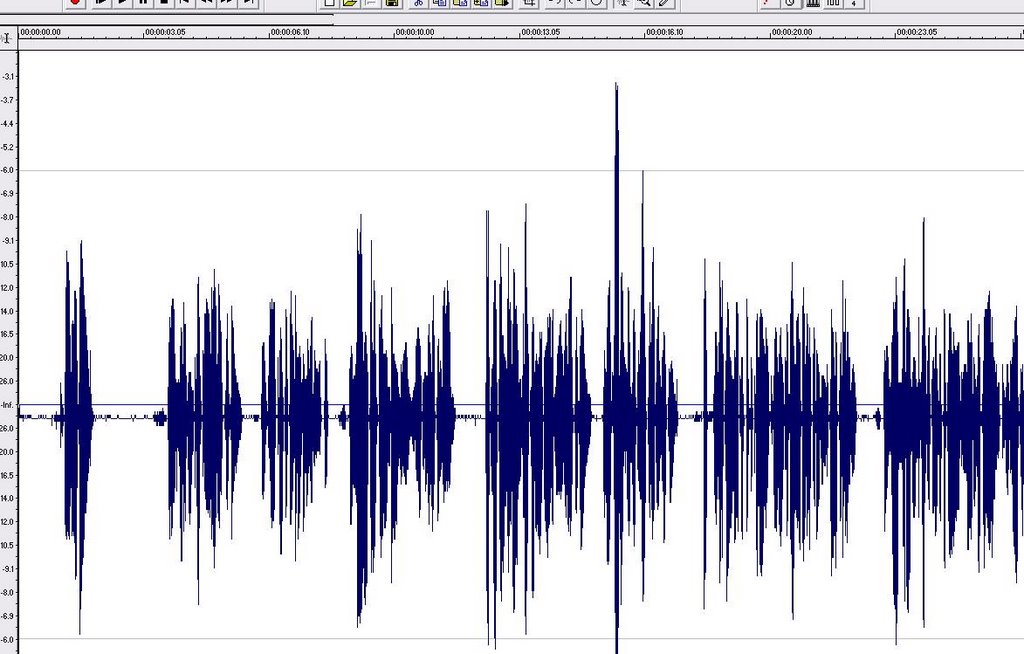
What causes this off center audio?
Could it be a damaged mic?
I can't really hear anything wrong with the panning, though there does seem to be a little extra noise.
I've been getting a few of these now, and I don't know what to tell people to fix it.
Google searches are coming up dry.

Any help here would be appreciated!
someaudioguy some audio guy audio engineering voice over production voice acting animation sound design