Some cool stories that caught my eye this week.
Mary McKitrick takes a look at the M600 Universal Microphone Mount, and seems pretty positive on it.
What's that ringing in your ears? It could be reverb, and AudioTuts has an awesome post with FIFTEEN FREE REVERB PLUGINS! Go get your echo on!
So I wasn't so stoked about the Sirius/XM merger, but it looks like we might finally be getting dual format radios compatible with both Sirius AND XM.
So it's a speaker.
And it's round, so you can roll it around, so that's cool.
Does this make a speaker worth $21,000?
I've been constantly trying to find good places to host audio (right now I'm using Humyo). No one really seems that interested in it. Video? Sure bring it on, but free audio not so much. Apparently there have been complaints about the compression used on Youtube, so they'll be improving the audio quality of Youtube videos. Could this be the answer to free media hosting?
And speaking of Youtube, what do you MEAN you've NEVER heard the theme to Super Mario played on a theremin!?!?!
Well here you go:

Showing posts with label free software. Show all posts
Showing posts with label free software. Show all posts
Saturday, August 9, 2008

Friday, July 11, 2008
Noise Reduction shoot out - Sound Forge, iZotope, Audacity, Audition, Waves, and doin it by hand!
 So, this is going to be a longer post...
We're going to compare 6 different methods of noise reduction.
I get a lot of questions about cleaning up audio after recording, hums, clicks, pops, line noise, neighbors, fridge, etc. A lot of people are still trying to gate or EQ this stuff out, and those methods don't work particularly well for voice over, especially dry auditions.
 Gating will turn off the audio signal when you're not speaking, which gives you perfect silence, but when you start speaking again the noise is back too. This can be VERY unnatural depending on the noise.EQ can work, but usually to the detriment of the entire piece of audio, as you are carving out chunks of the frequency spectrum. Those chunks start carving into your voice as well. Sort of like destroying the town to save the town...
 Ideally you'd just want to record clean in the first place, but sometimes you just can't help but knock something out and hope you can clean it up after the fact.Noise Reduction plugins to the rescue!To test, I set up my Solaris to records in "Figure 8" mode (so the front and back of the mic are recording equally), set one side up for me, and put the other side of the mic right up against my bathroom door with the fan running.
This is a worse case scenario for voice over, as fans tend to generate noise that slices right through the middle of the human voice's spectrum. That means that as you remove fan noise, you're likely carving out a chunk of the voice as well. A less extreme version of this would be a fridge kicking on or the AC running.
 All of these plugins (and doing it by hand) work on the same general principal, point out what undesirable noise looks like, and try to get rid of only that noise. [Check out the Audacity Tutorial for Noise Reduction in practice - Ed.]
I attacked the samples pretty aggressively with each method. For the test, the main idea was to all but eliminate the background noise, even if it damaged the voice. Real world, you would probably want to leave a little more noise to prevent damaging the recording.
So first up, here's the unaltered file:
Sony Sound Forge NR plugin:
iZotope RX De-Noiser:
Audacity NR plugin:
Adobe Audition NR Plugin:
Doin it by hand with Phase Inverse:
Waves Restoration X-Noise:
 Again, this is most certainly a worst case scenario when it comes to noise reduction, and hopefully you don't encounter this much noise on a regular basis. I find the results interesting listening back. There are two methods up here which are essentially free, and the most expensive plugin comes in a pack which runs about $1000.
So what do YOU think? Are there other plugins that I'm missing?
Thursday, January 3, 2008
Traverso Free Audio Recording/Editing Software - Simplicity = Virtue?
A week ago I wrote about Open Source Living, a site dedicated to cataloging open source/free software, and was really excited about their audio page. One particular program caught my eye, and I've finally had a chance to try it out.
 Traverso is a multi-platform, multi-track audio recording and editing program that boasts a simple and clean user interface. It's still technically a Beta (I downloaded v.42), but it's fully functional. Best of all, it's totally free!
Right from installing, driver support is great with Traverso instantly picking up my 410, and setting up 2 stereo recording tracks for me to play with. I have to say the interface is a little off-putting at first. It's very stark. There are NO bells or whistles on installation. It does have support for skins (and I don't know how that would affect functionality), but I'll only be dealing with the default.
What's good about this minimalist approach?
 Well, this program is tiny (about 35MB full install), and snappy. There was no lagging, stuttering, weird pauses, nuthin. It launches up and is ready to go. Recording and playback are accompanied with a very smooth screen slide , which is very pleasing to watch as you play through longer files. Simple. Clean.
This approach is also very low impact on the computer. Along with having a small install footprint, CPU and RAM use is also extremely low. I don't think I ever got above 5% CPU recording 2 Mono and 1 Stereo tracks, and Memory usage stayed between 15-20MB. Those are Audacity numbers for true multi-track recording (though Audacity does have better editing features). By comparison, to accomplish the same recording in Acid6Pro I'll hit 20% CPU usage and upwards of 90MB of RAM use. This is great news for people who haven't built bleeding edge quad core monster workstations. Add in very good exporting and burning. ogg/flac/mp3 support, unlimited undos, non-destructive editing, and it adds up to a pretty substantial package.
What didn't I like about Traverso?
 Well not a lot. With such a stark interface, it can be a little frustrating digging through menus to get to the features you want to use. None of the keyboard commands are anything like any other DAW I've ever used, so be ready to hunt through right click menus when you start. Along with that note, the cursor is frustrating to use. I spent 5 minutes alone just trying to playback something I had recorded. The selection and playback cursors are different cursors, and to move the playback cursor you have to hit the shift key. This is a bad decision. I got myself into a little trouble trying to rapidly make some quick edits. I ended up hitting the shift key so quickly that Windows tried to enable sticky shift, which is a major pain.
Also I had a small bug where I couldn't see waveforms while recording, but I'm pretty sure that's a me thing.
All in all I'm VERY impressed with the functionality and stability of Traverso. If you need recording on the cheap (heck on the Free) this is an excellent DAW, and one you should totally check out. Using this program with Audacity, was very much like working between Soundforge and Acid. It's a great unofficial software suite, and you wont spend a penny!
Traverso can be downloaded for Mac or Windows.
Traverso
Open Source Living: Audio Page
 Traverso is a multi-platform, multi-track audio recording and editing program that boasts a simple and clean user interface. It's still technically a Beta (I downloaded v.42), but it's fully functional. Best of all, it's totally free!
Right from installing, driver support is great with Traverso instantly picking up my 410, and setting up 2 stereo recording tracks for me to play with. I have to say the interface is a little off-putting at first. It's very stark. There are NO bells or whistles on installation. It does have support for skins (and I don't know how that would affect functionality), but I'll only be dealing with the default.
What's good about this minimalist approach?
 Well, this program is tiny (about 35MB full install), and snappy. There was no lagging, stuttering, weird pauses, nuthin. It launches up and is ready to go. Recording and playback are accompanied with a very smooth screen slide , which is very pleasing to watch as you play through longer files. Simple. Clean.
This approach is also very low impact on the computer. Along with having a small install footprint, CPU and RAM use is also extremely low. I don't think I ever got above 5% CPU recording 2 Mono and 1 Stereo tracks, and Memory usage stayed between 15-20MB. Those are Audacity numbers for true multi-track recording (though Audacity does have better editing features). By comparison, to accomplish the same recording in Acid6Pro I'll hit 20% CPU usage and upwards of 90MB of RAM use. This is great news for people who haven't built bleeding edge quad core monster workstations. Add in very good exporting and burning. ogg/flac/mp3 support, unlimited undos, non-destructive editing, and it adds up to a pretty substantial package.
What didn't I like about Traverso?
 Well not a lot. With such a stark interface, it can be a little frustrating digging through menus to get to the features you want to use. None of the keyboard commands are anything like any other DAW I've ever used, so be ready to hunt through right click menus when you start. Along with that note, the cursor is frustrating to use. I spent 5 minutes alone just trying to playback something I had recorded. The selection and playback cursors are different cursors, and to move the playback cursor you have to hit the shift key. This is a bad decision. I got myself into a little trouble trying to rapidly make some quick edits. I ended up hitting the shift key so quickly that Windows tried to enable sticky shift, which is a major pain.
Also I had a small bug where I couldn't see waveforms while recording, but I'm pretty sure that's a me thing.
All in all I'm VERY impressed with the functionality and stability of Traverso. If you need recording on the cheap (heck on the Free) this is an excellent DAW, and one you should totally check out. Using this program with Audacity, was very much like working between Soundforge and Acid. It's a great unofficial software suite, and you wont spend a penny!
Traverso can be downloaded for Mac or Windows.
Traverso
Open Source Living: Audio Page
Audacity Development for the Mac - A Call for Help?
 Recently I posted on Audacity's update to 1.3.4, well I didn't notice at the time, but that update was for Linux and Windows only (the two OS's I primarily use at home) not OSX. Apparently OSX has STILL not received the update as there are no Mac users working on Audacity anymore.
TUAW links to the Audacity forums, where recently a call for developer help just went out. I was happy to see that it was answered pretty quickly on both the forum AND TUAW. With that I thought I would second the call, help put out the word, as Audacity is a fantastic audio editor, and it's never good to let a platform lag too far behind. To my knowledge it's still the only Open Editor that plays across all three major PC platforms.
I still find it odd though, that with the Mac becoming a more and more attractive solution (thanks Vista), and has always been known as a "creative friendly" platform, that there isn't more development of this kind of software.
I don't normally write about this (I only made it through one semester of CS), but if anyone out there develops for Mac, and has some time to throw in for a GREAT piece of software, I'm sure it would be appreciated!
TUAW
Audacity Forum
Sunday, December 30, 2007
Top Ten List NerdGasm! Lifehackers Top Twenty Top Ten Lists!

I'm a SUCKER for Top Ten lists, and Lifehackers Top Twenty Top Ten lists doesn't disappoint!
- Top 10 iPhone Applications
- Top 10 Free Windows Downloads
- Top 10 USB Thumb Drive Tricks
- Top 10 Free Computer System Recovery Tools
- Top 10 Wi-Fi Boosts, Tweaks and Apps
- Top 10 Free Video Rippers, Encoders, and Converters
- Top 10 Free Wallpaper, Fonts and Icon Sources
- Top 10 Body Hacks
- Top 10 Ways to Sleep Smarter and Better
- Top 10 Google Products You Forgot All About
- Top 10 Must-have Firefox Extensions
- Top 10 Ubuntu Applications
- Top 10 Ways to Clean Up Your PC
- Top 10 Mac OS X Tweaks
- Top 10 DIY Office Projects
- Top 10 Free Mac Downloads
- Top 10 Food and Drink Hacks
- Top 10 New and Improved Apps of 2007
- Top 10 Home Networking Tricks
- Top 10 PDF Tricks
I think I need a cigarette...
Thursday, December 27, 2007
Free Open Source Software for You for Free. Did I Mention that it's FREE?
 I'm a big fan of the free stuff. I write a lot about Audacity. I've checked out programs like Reaper (sadly no longer free) and Wavosaur. I would gladly ditch Windows were it not for a small (and shrinking) number of programs that I need to use.
Enter Open Source Living, a web site dedicated to collecting and cataloging Open software. Right now the collection is a little lean, but already has some great software finds, a few of which I had never heard of but will be downloading soon to try out.
Their Audio Section is already pretty formidable with Players, Podcasters, Recording software, Mastering, MIDI, and Rippers.
If you're looking for some great software (and hey the price is right) I would highly recommend checking this out!
Friday, December 7, 2007
News Sound Bites - Wavosaur, Writers, and Hi-Def Transfers
Just a couple cool links for ya'll.
Download Squad has the scoop on Wavosaur, a free tiny portable audio editing suite. Does it have what it takes to compete against products like Audacity?
Gizmodo is looking for writers! If only there were an influx of really good writers, with time on their hands, looking for new projects ... hmmm ... (I kid because I love)
Sound and Vision Magazine has a great article on the challenges of transferring Blade Runner to HD-DVD and Blu-Ray. YAY! I get to buy the movie AGAIN once I get an HDTV! I can't wait!
Download Squad has the scoop on Wavosaur, a free tiny portable audio editing suite. Does it have what it takes to compete against products like Audacity?
Gizmodo is looking for writers! If only there were an influx of really good writers, with time on their hands, looking for new projects ... hmmm ... (I kid because I love)
Sound and Vision Magazine has a great article on the challenges of transferring Blade Runner to HD-DVD and Blu-Ray. YAY! I get to buy the movie AGAIN once I get an HDTV! I can't wait!
Saturday, November 24, 2007
Free VST! Free tube plugin! Free!

LOL, I love writing obnoxious post titles...
Anywho, if you're looking for decent little tube plugin to add a little warmth (or overdrive it for some nice crunchy distortion), Togu Audio Line has you covered ... for free!
It's simple, and it works well. I dig it!
Download it here!
Saturday, November 17, 2007
Ripping DVD Audio to MP3! The fun and easy way!
Hey all!
I've gotten this question a couple times now, and thought I'd record a quick tutorial on it.
There are some ad agencies that are really good at giving voice over clients a copy of the commercials they record. In this digital age, the copy usually comes in the form of a DVD. However, when the actor wants to put together a demo, it can be difficult to pull the audio off of a DVD to mix into a demo (usually an mp3 in this day).
Before I would either run a line in and record in real time, or there were always really tricky methods of converting DVD's to AVI's, and midway through the process you could grab a rendered WAV file. More recently, I've been importing DVDs into Vegas, and then saving the file from there. Vegas, however, can cost almost $600.
I just caught a tip on Lifehacker with a much easier (and FREE) piece of software to get this job done!
Here's Lifehacker's link.
Here's a link to another program that will pull audio off of other video files (avi, wmv, divx, mov, etc).
So please pardon the fact that I was a little congested when I recorded this, and as a fun bonus, see if you can find the moments where my wireless mouse was wigging out on me!
I've gotten this question a couple times now, and thought I'd record a quick tutorial on it.
There are some ad agencies that are really good at giving voice over clients a copy of the commercials they record. In this digital age, the copy usually comes in the form of a DVD. However, when the actor wants to put together a demo, it can be difficult to pull the audio off of a DVD to mix into a demo (usually an mp3 in this day).
Before I would either run a line in and record in real time, or there were always really tricky methods of converting DVD's to AVI's, and midway through the process you could grab a rendered WAV file. More recently, I've been importing DVDs into Vegas, and then saving the file from there. Vegas, however, can cost almost $600.
I just caught a tip on Lifehacker with a much easier (and FREE) piece of software to get this job done!
Here's Lifehacker's link.
Here's a link to another program that will pull audio off of other video files (avi, wmv, divx, mov, etc).
So please pardon the fact that I was a little congested when I recorded this, and as a fun bonus, see if you can find the moments where my wireless mouse was wigging out on me!
Thursday, November 15, 2007
Audacity Updated to 1.3.4

Your favorite free audio editor is now a tenth of a tenth of a point better!
Just recently updated to 1.3.4, I'm seeing some nice improvements. Switches like solo and mute seem to work smarter (and you can no longer jam the program up by muting and solo-ing a track at the same time). You can now add meta-data to files other than MP3, and a few of the plugins have gotten decent updates (I can't remember if 1.3.3 had a "gverb" but it's a really decent reverb/room shaping plugin).
My only complaints are:
**You still can't record to the same track over multiple takes. Every time you stop recording and start again it opens a new audio track, so you can't ever go back to review and re-record without having to cut and paste a file back together.
**Also, I still hate the "Preview" feature. You only get 2 seconds to hear if you like a change, and that's SO not enough if you're doing a lot of editing. You end up just rendering the edit, listening, and rolling back the edit if you don't like it. The preview feature has always been a waste of time in Audacity.
**Lastly, there's still no decent marker. I know you can hit CRTL-M (or remap it to something else), but the way it forces you to name the marker, and the fact that the marker isn't a part of the audio file itself (it becomes a new "track" just for markers) makes for an awkward and cluttered work environment.

<----Click pic to see what I mean.
All in all, it's an awesome package that totally rivals (and in some ways surpasses) programs like Sound Forge XP (about $80), but it's totally free! CLICK HERE to download and see the full list of updates from 1.3.3!
Enjoy!
Thursday, August 23, 2007
How to Record Streaming Audio on The Internet
So if you need to record something that streams on line, you can patch in a mixer, making sure to route a few Aux channels, or you could check out FreeCorder.

It's a plugin for Firefox that gives you the ability to suck the audio down from any web item and save it as an MP3 or WAV. It also does a pretty good job of ignoring system sounds as it's tied to the browser not to the internal "what you hear" soundcard drivers.
Pretty sweet!
More write up @ DownloadSquad
OH! Did I mention that FreeCorder is ... FREE!
It's a plugin for Firefox that gives you the ability to suck the audio down from any web item and save it as an MP3 or WAV. It also does a pretty good job of ignoring system sounds as it's tied to the browser not to the internal "what you hear" soundcard drivers.
Pretty sweet!
More write up @ DownloadSquad
OH! Did I mention that FreeCorder is ... FREE!
Wednesday, August 8, 2007
Some Audio Guy Mail: "Speech to Text?"

So for the couple months that this blog has been up, I've been getting mail. Most of it has been in an effort to make my woe-fully undersized genitalia bigger (god bless spam filters), but every now and then a decent question does actually pop up.
I used to just answer the question directly, but I realized (while hunting for things to write about), that I could use those questions for posts.
I know, right? I'm pretty much the smartest person I know... sigh ...
So anywho, the first email to succumb to this treatment is from N.A.:
"Morning ! I was looking on the various web pages for a decent "Speech toText" program.. And came across your blog from a Dig story on BitTorrents.. I was wondering if you knew of any programs out there(obviously free is preferable) any info would be appreciated.. Thanks..N"
Well N, first off, thanks for the question. I would narrow your search down a bit, maybe try something more specific like "Speech Recognition" or "Dictation Software" or "Free Voice Recognition".
There are two main (and for now still separate) "paths" to interacting with computer with your voice. Talking to your computer and having your computer talk to you. The more recent advances have been in "Text to Speech" or "TTS" technologies, and there has been some really exciting work in getting samples of voices and slicing up those samples to form any number of other words, even at the consumer level. Some day I'll be able to make James Earl Jones say ANYTHING I WANT!!! MOOO-HA-HA!!!
*Ahem*
What seems to be moving slower is voice/speech recognition. There is of course some great work going on with the Dragon folks, and some of the Microsoft One-Note voice recognition (built into XP tablet edition and several versions of Vista) is compelling, but neither are anywhere near Star Trek level utility (I know I still rate everything by ST:TNG ... NERD).
As for free, well that gets even trickier. Most of what I can find (especially under say a BSD license) has more of an academic or engineering slant. It's usually raw code designed to be inserted into an already established product to add function as opposed to a ready to go stand alone piece of software. Carnegie Mellon's Sphinx is a perfect example of this.
So I know that doesn't really "answer" your question, but hopefully I've delivered enough information to at least help you get a little farther.
And, if any of my 30 or so readers have any additional info, PLEASE drop us a comment. Always appreciated!
Tuesday, August 7, 2007
An Introduction to Linux Audio
I have to say, I've been personally happy using Windows the last couple years to record and edit, but I can't say I haven't been curious. Being OS Agnostic, I totally wouldn't mind getting into a little hawt Linux action from time to time.
Now if someone could also develop a distro that would run off of a pen drive like these portable apps, I would be in hawg-heaven. Imagine being able to go to any computer with an open USB port, punching in a drive, and BAM(!) instant audio workstation!
read more | digg story
"Linux has come a long way in the last 10 years. At that time, if you were looking through the main audio and music applications on other operating systems, you would have struggled to find comparable, fully developed, apps on Linux. Nowadays, while no one would say the job was done, they could point to an assortment of high-quality applications..."
Now if someone could also develop a distro that would run off of a pen drive like these portable apps, I would be in hawg-heaven. Imagine being able to go to any computer with an open USB port, punching in a drive, and BAM(!) instant audio workstation!
read more | digg story
Friday, August 3, 2007
AUDACITY Tutorials GALORE!
So for newbies trying to record I try to set up the simplest recording environment I can. I tend not to like USB mics, but lately it's been hard to deny how much less intimidating the simplicity of ONE cable to the computer is.
However, once that is out of the way what to do with the audio entering the computer?
I really like Audacity for beginners. It's not very pretty, but it's pretty easy to learn, and well ... you know ... the price is, uh, pretty good. I charge quite a bit for setup and instruction, but often I find that the client really just needed a little advice, not a full blown instructional session.
So not to undercut my own business, but if you're one of those just needing a little push, I found this great little tutorial on Youtube.
Also, if you want more advanced Audacity goodness, you can go here.
Enjoy!
However, once that is out of the way what to do with the audio entering the computer?
I really like Audacity for beginners. It's not very pretty, but it's pretty easy to learn, and well ... you know ... the price is, uh, pretty good. I charge quite a bit for setup and instruction, but often I find that the client really just needed a little advice, not a full blown instructional session.
So not to undercut my own business, but if you're one of those just needing a little push, I found this great little tutorial on Youtube.
Also, if you want more advanced Audacity goodness, you can go here.
Enjoy!
Wednesday, August 1, 2007
Danger! Music Eating Virus Alert! Danger!
Wow!
This is farggin awful. According to Symantec, there's a worm floating around that chews through MP3's. I'm sure it doesn't differentiate between your "backups" (wink-wink) and your legit back ups.
That's ... bad ...
I blame the RIAA.
Here's a more eloquent write up over at Gizmodo.
This is farggin awful. According to Symantec, there's a worm floating around that chews through MP3's. I'm sure it doesn't differentiate between your "backups" (wink-wink) and your legit back ups.
That's ... bad ...
I blame the RIAA.
Here's a more eloquent write up over at Gizmodo.
Tuesday, July 10, 2007
10 Alternatives to iTunes for managing your iPod

This overview details the features (with screenshots) of 10 different programs other than iTunes to manage your iPod. Tutorials are included for every program, and they’re all either free or Open Source.
I've been using WinAmp for the last year, and really see no reason to use iTunes, other than iTunes is prettier ... I guess...
read more | digg story
***EDIT***
No sooner do I post this then the server goes down for the site.
So here's a Wiki with even MORE info!
Tuesday, June 26, 2007
Top 5 mp3 Converters ???
Just caught this on Digg.
With so much voiceover being done over mp3, it's getting more and more complicated to explain to actors what they need to do to send us auditions. With so many people on Mac, fewer and fewer seem to understand that an .aac/.aiff/.m4a is NOT the same thing as an .mp3. Love it or hate it, .mp3 pretty much plays well with everyone (except GarageBand apparently).
SO, I'm constantly on the lookout for software that will make this easier. Coming across this article from CoolUtils.com, there are some excellent recommendations for mp3 converters here, but I'm a little non-plussed by this major FUD paragraph here:
"But first a little word of warning. MP3 files, and MP3 converting, is extremely popular right now. While that does tend to open up the market to an array of different products for you to choose from, it also attracts the less desirable people as well. The kind of people that would just as soon give your computer a virus than a good MP3 converter. That being said I am going to suggest that you do not deal with what is advertised as free MP3 converters. Most of these products offer a free trial and that should be more than enough for you to convert some files and find the software you like. But a free MP3 converter is an invitation for a devious person to get a dangerous, and destructive virus, on to your computer. That isn’t to say that an MP3 converter you pay for couldn’t also cause you problems, but a company that is taking your money from their own website is a little less likely to destroy your computer than an anonymous company offering you something for free."
Whoa there! I have to say this would exclude people from a huge wealth of software out there, like say open source software. I'm a really big fan of programs like Audacity and CDex, because they're easy to use, and the price is right. Audacity especially since it'll play well with both Mac and PC (Sound Forge and Audition I'm looking in your general direction).
So check out the list, but don't write off a program just because it's free. If you're really worried about giving it a spin, maybe google for a review or something...
someaudioguy some audio guy voice over recording voice acting directing production demo software help how to adr dubbing mp3
read more | digg story
With so much voiceover being done over mp3, it's getting more and more complicated to explain to actors what they need to do to send us auditions. With so many people on Mac, fewer and fewer seem to understand that an .aac/.aiff/.m4a is NOT the same thing as an .mp3. Love it or hate it, .mp3 pretty much plays well with everyone (except GarageBand apparently).
SO, I'm constantly on the lookout for software that will make this easier. Coming across this article from CoolUtils.com, there are some excellent recommendations for mp3 converters here, but I'm a little non-plussed by this major FUD paragraph here:
"But first a little word of warning. MP3 files, and MP3 converting, is extremely popular right now. While that does tend to open up the market to an array of different products for you to choose from, it also attracts the less desirable people as well. The kind of people that would just as soon give your computer a virus than a good MP3 converter. That being said I am going to suggest that you do not deal with what is advertised as free MP3 converters. Most of these products offer a free trial and that should be more than enough for you to convert some files and find the software you like. But a free MP3 converter is an invitation for a devious person to get a dangerous, and destructive virus, on to your computer. That isn’t to say that an MP3 converter you pay for couldn’t also cause you problems, but a company that is taking your money from their own website is a little less likely to destroy your computer than an anonymous company offering you something for free."
Whoa there! I have to say this would exclude people from a huge wealth of software out there, like say open source software. I'm a really big fan of programs like Audacity and CDex, because they're easy to use, and the price is right. Audacity especially since it'll play well with both Mac and PC (Sound Forge and Audition I'm looking in your general direction).
So check out the list, but don't write off a program just because it's free. If you're really worried about giving it a spin, maybe google for a review or something...
someaudioguy some audio guy voice over recording voice acting directing production demo software help how to adr dubbing mp3
read more | digg story
Sunday, June 17, 2007
Mobile Music Software NOW FREE!

For Symbian and Windows Mobile Users!
I've been using Syntrax for years. Back when it was $30, it was an impressive little audio suite, but now that it's free, well free is just ... better.
Works with MIDI, and can manipulate .WAV files (even the PCM ones you can record from the PPC). When you're finished just sync up with a computer, and you can transfer you're work over too. Neat Stuff!
For audio "Doodling" on the go, you really can't beat it, and while I haven't NEEDED it very often, it has saved my @$$ a couple times.
See also:
PhoenixStudio (sorry for the Handango Link) and Golden Crater Pocket Mixer (Baby Sound Forge!),
Friday, May 11, 2007
COOL FREE PROGRAM! Sonic Visualizer! Free!
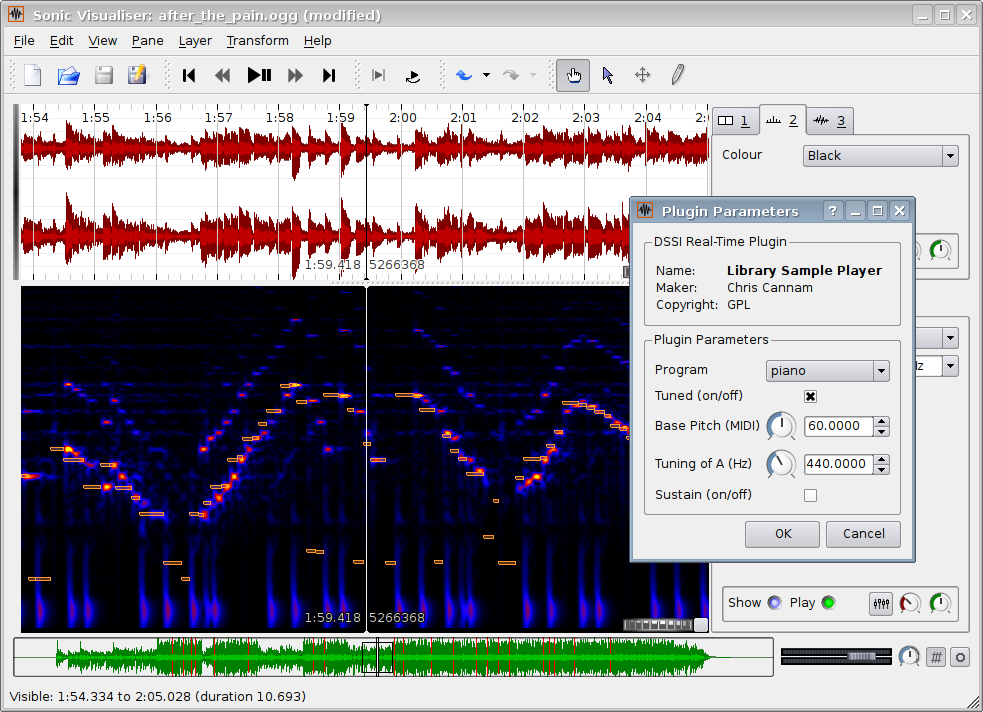
Holy crap this one is good.
I know I've become impatient when loading Sound Forge is inconvenient for a quick analysis of a sound.
This product seeks to eliminate that.
I've just loaded it up, and thrown some voice work in. It's quick. It's clean. It does just what I need, and also has the ability to load plugins.
From their site:
"Sonic Visualiser is Free Software distributed under the GNU General Public License. The 1.0 release is available now in source code form or as binaries for Linux, OS/X, and Windows."
Pick it up here!
someaudioguy some audio guy recording voice over auditions software free plugin voice acting animation production demo engineering
Subscribe to:
Posts (Atom)