Showing posts with label firewire 410. Show all posts

Wednesday, April 16, 2008

A post on Microphones, Sound Cards, and Sound Proofing

MICROPHONE!
Digging through some of the old equipment at one of the casting studios I work at (the oldest voice over casting studio in LA Woot!) I stumbled on a box of old microphones. Most were crap, but tucked away was an original capsule SM56! Had to tinker with the impedance, but got it set up, and it's now enjoying full time use. Near as I can tell, the mic is almost 40 years old!


SHURE SM57

SOUNDCARD!
I love Stumbleupon. It sucks so much of my life away, just stumbling round teh intarwebs.
Caught this Flickr pic from sneeka2 comparing the Firewire410 (my soundcard) to the Mac Mini. I was actually kinda surprised.
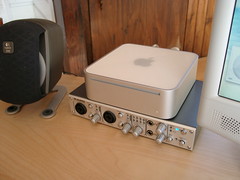


mini
Originally uploaded by sneeka2


I've been kinda disappointed in soundcards of late. Besides some of the Mixer/Interface hybrids, there's been depressingly little development. Is there anything you readers are looking forward to? Let me know!

M-AUDIO NRV10


SOUND PROOFING!
For those of you trying to set up your own recording booths, check out this vid from the Revision3 Gazette, and you can see what they went through to reduce echo in their studios. Now obviously this is reinforcement on an industrial level, but the lessons here are still valid for us closet junkies.


someaudioguy some audio guy voice over demo production voice acting adr dubbing animation anime narration

Tuesday, March 25, 2008

NRV10 Update - You CAN dasiy-chain the NRV10 with the Firewire 410!!!

I LOVE Firewire!

I updated the driver on my desktop to play with the NRV10. Apparently there is now only one "family" driver for M-Audio firewire products.

I didn't feel like disconnecting my FW410 to plug in the NRV10, so I used the spare port on the FW410. Upon rebooting, my computer ran it's updates, and could see both the FW410 and the NRV10.

I fired up Acid, and set up a couple audio tracks. Acid not only saw both devices, but let me run inputs from different devices at the same time.

Now this might not seem like a huge deal. You've always been able to daisy-chain firewire devices, but usually that means hooking up an external hard drive to your external soundcard. As far as I knew, very few sound cards could be daisy-chained to show up as a single multi-input device. Those devices usually had to match as well, as they would have to use the same driver. M-Audio's firewire "family" driver marks the first time, that I know of, where two different devices can be linked and used as one big interface. This is something that can ONLY be done over Firewire, as USB can't share resources like this.

MAudio NRV10 Analog Mixer and Firewire Audio Interface

What do you even call that? Asymmetrical audio interface daisy chaining?

I don't know, but between the FW410 and the NRV10 I now have 12 routable inputs (10 analog 2 stereo mix down), 2 digital inputs, 10 analog outs (18 software routable outs), and 2 digital outs all in a fairly compact set up.

I'm stoked!

M-Audio FireWire 410 4-In / 10-Out FireWire Mobile Recording Interface

And if you want to see more shots of the NRV10, you can click here for my un-boxing post!

Thursday, November 8, 2007

I'm not sold on the MBox2 Micro...

Future Music (my favorite "DVD-stuck-to-the-outside-of-the-magazine-with-sticky-goop" magazine) has the scoop on the new MBox2 Micro, just announced by Digidesign.


It's small.
It's sexy.
I just don't get what it's for.


Near as I can tell it's a thumb drive with Protools software and a headphone jack. There are no inputs, so you can't record into it, and at $279 it's just $20 less then the MBox2 Mini or the M-Audio Firewire 410 (what I use).


I mean even the MicPortPro, at HALF the price, has an XLR port with phantom power and a dedicated headphone jack, and it's not much bigger than the micro.


It just doesn't come with ProTools...


Here's FutureMusic's write up, and here's Digidesign's announcement.