Showing posts with label sound editing. Show all posts

Thursday, May 22, 2008

'Indiana Jones and The Kingdom of the Crystal Skull' is fun, but MAN am I tired of crappy CG effects...

So before I jump in I want to make 2 points:

1. I'm going to try really hard to make spoilers avoidable. Any time I bring up specific plot points I'll blend the color of the text into the background, so you'll have to highlight that text to read it (if anyone REALLY cares what I have to say).

2. This is going to read A LOT like my diatribe on CG and Jurassic Park...

You've been warned!

I don't like to review movies here. Other places do that, so I'll try to stay focused on the technical aspects of the film. That said, the movie IS fun, and while I have some issues with the plot, the larger than life characters are so much fun to watch on screen (Karen Allen and Harrison Ford!?!?! COME ON!!!). It's hard not to get amped about a film like this.

Seriously, I was 8 when the last Indy movie came out.

My biggest problem with the film is I happen to hate LucasFilm visual effects. They look fake. REALLY fake. They look like giant cartoons. They DON'T relate to gravity. They become hyper-kinetic, moving in ways that real objects don't. LF relies on these effects as front and center visual pieces, and they just don't hold up. They're glaringly obvious.
Indy movies were always fantastic adventures taking us around the globe to exotic locations. Most of this movie felt like it was shot on a sound stage.

The most egregious for me (spoilers, highlight following text):
-GOD DAMNED CG GOPHER THINGS!?!?!
-After the bomb goes off, we really needed a bouncing cg fridge? Were refrigerators in the 50's made out of rubber? THEY COULDN'T HAVE JUST DROPPED A REAL FRIDGE?!?!
-CG Monkeys looked like crap. CG ants not much better. CG scorpions even worse. Even Temple of Doom had real bugs...
-Aliens? Sigh... Aside from just being plain lazy story telling, one of the worst Aliens I've ever seen. Why not just use a puppet like in Close Encounters?
-People in the showing I went to laughed at how Blanchett's character met her demise. Looked silly, made little sense.
-Flying saucer? Meh....


I think the problem here is laziness. Movies like Epsiodes 1-3 of Star Wars, Speed Racer (talk about vomiting cotton candy all over my childhood), King Kong (Jackson's) and now Indy 4 have failed to learn the lessons of movies that have come before (Jurassic Park still looks awesome and was made 15 years ago).
You can't make the whole movie up in post. CG only works to augment what you've already shot. The only exceptions are highly stylized movies like comic book films, and even then this stuff shouldn't be front and center.
Iron Man did a MUCH better job of tackling that. Even after seeing it a second time, there were still several moments where I had a really hard time figuring out if it was a guy in a suit, CG, or both.

Directors are going to have to relearn their craft IMHO. CG makes it WAY to easy to have your characters perform the impossible. Not the improbable, or the fantastic, but the impossible. The take-you-out-of-the-moment-and -break-suspension-of-disbelief-impossible. That moment where you go from having fun to realizing you're just watching some silly cartoon in a movie theater, and it doesn't matter what happens to the characters next because it's just going to be even more ridiculous then what they've already done.
Imagine if the boulder scene in Raiders had just been a wash of CG bouncing rocks and motion blurring effects.There's no fun in that...

So, all that above being said, Skywalker Sound did an AMAZING job. This movie sounded every bit like an Indy film. Great score, incredible mixing and ADR (Barbara Harris knows her shit), and the foley was incredible. I have to say I got a little giddy when I heard the classic Indiana Jones"punch" sound effect (sounds like a shotgun going off while breaking a 2x4).

All in all the movie is fun, with great performances, and is totally worth seeing. It is Indiana Jones after all, and it's been 20 years since the last one came out, so that's reason enough right there.

Having seen it though, I don't think I need to see it again.

A friend of mine still hasn't seen Iron Man though. I think I might be up for a third viewing there...

Wednesday, March 19, 2008

Recording Booth on the Cheap!

So my friend Erik was having some problems recording auditions from home.

He lived in a very modern apartment with nice hardwood floors, off a fairly busy street, and the only space he could dedicate to a microphone was a tiny little closet.


The quality of his auditions was ... lacking ...


Off the advice from a friend, he started trying to put up foam (as you can see in this picture), but actual acoustic foam can be kind of expensive, and that really wasn't his problem. His auditions suffered from a boomy echo, and foam wouldn't help that very much.

Here's an example:


The problem with closets is they become low frequency echo chambers. Low frequency sound loves to bounce around, and hard flat surfaces set at 90 degrees just help that sound bounce around. The ridges in most foam treatments aren't really big or deep enough to properly diffuse, and the foam itself is rarely thick enough to properly absorb that kind of bass energy.


What Erik needed was to subtly change the shape of his room, and try to reduce the hard reflections he was getting. I told him to try hanging two packing blankets in half circles behind him and his mic, and made him throw down an old carpet scrap on the floor. I then also had him pass his audio through a low-cut filter.

It's ugly, but the setup cost less than $30 (also less than what he spent on foam).


Here's what his audio sounds like now:


Not a bad jump if I say so myself (which I do).


And if you want to hear Erik in action, here's a link to a Funny or Die vid he did during the writers strike. Very funny!

someaudioguy some audio guy help how to recording home recording voice over voice acting recording booth sound proof auditioning actors

Thursday, January 3, 2008

Traverso Free Audio Recording/Editing Software - Simplicity = Virtue?

A week ago I wrote about Open Source Living, a site dedicated to cataloging open source/free software, and was really excited about their audio page. One particular program caught my eye, and I've finally had a chance to try it out.

Traverso is a multi-platform, multi-track audio recording and editing program that boasts a simple and clean user interface. It's still technically a Beta (I downloaded v.42), but it's fully functional. Best of all, it's totally free!

Right from installing, driver support is great with Traverso instantly picking up my 410, and setting up 2 stereo recording tracks for me to play with. I have to say the interface is a little off-putting at first. It's very stark. There are NO bells or whistles on installation. It does have support for skins (and I don't know how that would affect functionality), but I'll only be dealing with the default.

What's good about this minimalist approach?

Well, this program is tiny (about 35MB full install), and snappy. There was no lagging, stuttering, weird pauses, nuthin. It launches up and is ready to go. Recording and playback are accompanied with a very smooth screen slide , which is very pleasing to watch as you play through longer files. Simple. Clean.
This approach is also very low impact on the computer. Along with having a small install footprint, CPU and RAM use is also extremely low. I don't think I ever got above 5% CPU recording 2 Mono and 1 Stereo tracks, and Memory usage stayed between 15-20MB. Those are Audacity numbers for true multi-track recording (though Audacity does have better editing features). By comparison, to accomplish the same recording in Acid6Pro I'll hit 20% CPU usage and upwards of 90MB of RAM use. This is great news for people who haven't built bleeding edge quad core monster workstations. Add in very good exporting and burning. ogg/flac/mp3 support, unlimited undos, non-destructive editing, and it adds up to a pretty substantial package.

What didn't I like about Traverso?

Well not a lot. With such a stark interface, it can be a little frustrating digging through menus to get to the features you want to use. None of the keyboard commands are anything like any other DAW I've ever used, so be ready to hunt through right click menus when you start. Along with that note, the cursor is frustrating to use. I spent 5 minutes alone just trying to playback something I had recorded. The selection and playback cursors are different cursors, and to move the playback cursor you have to hit the shift key. This is a bad decision. I got myself into a little trouble trying to rapidly make some quick edits. I ended up hitting the shift key so quickly that Windows tried to enable sticky shift, which is a major pain.
Also I had a small bug where I couldn't see waveforms while recording, but I'm pretty sure that's a me thing.

All in all I'm VERY impressed with the functionality and stability of Traverso. If you need recording on the cheap (heck on the Free) this is an excellent DAW, and one you should totally check out. Using this program with Audacity, was very much like working between Soundforge and Acid. It's a great unofficial software suite, and you wont spend a penny!

Traverso can be downloaded for Mac or Windows.

Traverso


Open Source Living: Audio Page

Thursday, December 27, 2007

The REBOOT dedicates an entire episode to Game Audio

Hey this is a pretty good show! I've never seen this podcast before, but I think I'll be subscribing. Wonder if I can Miro it? ... hmmm ...

Anywho, a reader sent in this specific episode knowing my about my love of all things audio, and ... they also just happen to be one of the guys interviewed. LOL, I love my readers!

This entire episode of The Reboot is on video game audio, it's development, and evolution into a more cinematic form, so check it out. It's pretty cool.


Thanks David!

Thursday, November 15, 2007

Audacity Updated to 1.3.4


Your favorite free audio editor is now a tenth of a tenth of a point better!

Just recently updated to 1.3.4, I'm seeing some nice improvements. Switches like solo and mute seem to work smarter (and you can no longer jam the program up by muting and solo-ing a track at the same time). You can now add meta-data to files other than MP3, and a few of the plugins have gotten decent updates (I can't remember if 1.3.3 had a "gverb" but it's a really decent reverb/room shaping plugin).

My only complaints are:
**You still can't record to the same track over multiple takes. Every time you stop recording and start again it opens a new audio track, so you can't ever go back to review and re-record without having to cut and paste a file back together.

**Also, I still hate the "Preview" feature. You only get 2 seconds to hear if you like a change, and that's SO not enough if you're doing a lot of editing. You end up just rendering the edit, listening, and rolling back the edit if you don't like it. The preview feature has always been a waste of time in Audacity.

**Lastly, there's still no decent marker. I know you can hit CRTL-M (or remap it to something else), but the way it forces you to name the marker, and the fact that the marker isn't a part of the audio file itself (it becomes a new "track" just for markers) makes for an awkward and cluttered work environment.


<----Click pic to see what I mean.


All in all, it's an awesome package that totally rivals (and in some ways surpasses) programs like Sound Forge XP (about $80), but it's totally free! CLICK HERE to download and see the full list of updates from 1.3.3!

Enjoy!

Thursday, November 8, 2007

I'm not sold on the MBox2 Micro...

Future Music (my favorite "DVD-stuck-to-the-outside-of-the-magazine-with-sticky-goop" magazine) has the scoop on the new MBox2 Micro, just announced by Digidesign.


It's small.
It's sexy.
I just don't get what it's for.


Near as I can tell it's a thumb drive with Protools software and a headphone jack. There are no inputs, so you can't record into it, and at $279 it's just $20 less then the MBox2 Mini or the M-Audio Firewire 410 (what I use).


I mean even the MicPortPro, at HALF the price, has an XLR port with phantom power and a dedicated headphone jack, and it's not much bigger than the micro.


It just doesn't come with ProTools...


Here's FutureMusic's write up, and here's Digidesign's announcement.

Beginner Audacity Tutorial, WITH VIDEO!

Yes, an exclamation point in the title!

So, I've put together a little video with some basic tips to improving the sound of home recordings using Audacity.

And here it is:


Basically, we just want to clean up the sound of an audition. As an example, here's a sample of the audio used before cleaning:


And after:


Also, since the streaming vid is a little hard to see whats going on (even when you expand to full screen), I do have a high quality version hosted on divshare, but it's big (180MB) and DivShare is moving DOGSLOW right now.

AUDACITY TUTORIAL HIGH-ISH QUALITY

If anyone has any advice on better file hosting (for CHEAP), please let me know!

Wednesday, August 1, 2007

Monday, July 30, 2007

Really REALLY Tiny Audio Workstation


Gizmodo has the scoop on an ultra tiny audio "workstation" from the Trinity Audio Group.

It uses a custom touch screen version of Linux called Transmission, and the stats are a little weak (500MHz proc, 256MB RAM, 40GB hard drive), but when you're focused on ONLY audio, something like this could come in handy.
Anywho, it also comes with wifi, USB, XLR, and 1/4" inputs, nicely done there.

These were the kinds of devices I was hoping to see when UMPC's started coming out. Rather than try and compete against laptops as jack-of-all trades devices, why not go niche? If the pricing isn't insane, I might have found a decent reason to leave the Thinkpad at home...


Here's the Gizmodo story.

someaudioguy some audio guy recording voice over vo voiceover animation acting anime digital microphones daw

Thursday, June 28, 2007

Why New Music Doesn't Sound As Good As Older Music

Winning the loudness war! With state of the art compression, we think nothing of boosting the "Loudness" of our tunes now. Unfortunately that can really hurt what we're trying to help...

I've actually had this argument with a couple clients. A few in particular love using tons of compression. It makes their voices sound full and rich and loud. Problem is that unless the audition is played on pro monitors with a lot of tolerance, instead played, on say, crappy speakers built into an LCD, then the audition is going to sound garbage. It'll sound muddy or distorted, and more than likely the person listening will reach for the volume knob.

If they're already reaching for the volume, why not reach for a skip track button?

Click READ MORE to check out the story on Yahoo news.

read more | digg story
someaudioguy some audio guy audio recording voice over demo production voice acting auditions adr dubbing foley
And here's a practical example from the linked article showing what kind of damage can occur by making things "loud".

Friday, May 11, 2007

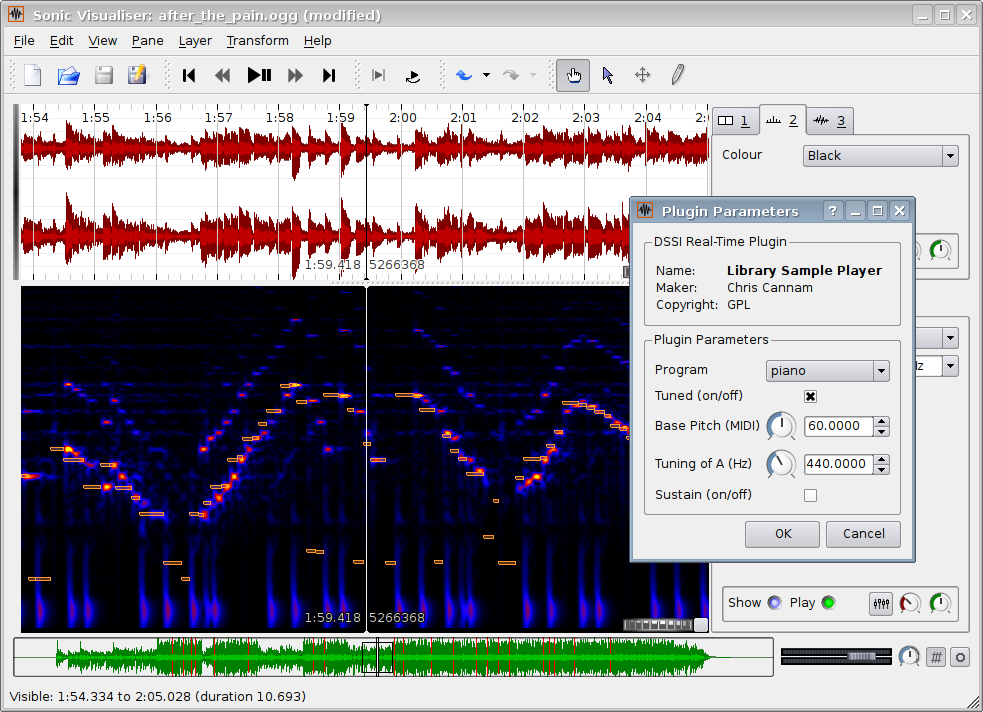
COOL FREE PROGRAM! Sonic Visualizer! Free!


Holy crap this one is good.
I know I've become impatient when loading Sound Forge is inconvenient for a quick analysis of a sound.

This product seeks to eliminate that.

I've just loaded it up, and thrown some voice work in. It's quick. It's clean. It does just what I need, and also has the ability to load plugins.

From their site:

"Sonic Visualiser is Free Software distributed under the GNU General Public License. The 1.0 release is available now in source code form or as binaries for Linux, OS/X, and Windows."

Pick it up here!
someaudioguy some audio guy recording voice over auditions software free plugin voice acting animation production demo engineering


Monday, May 7, 2007

FREE PLUGIN VST!!! Sound Like a Dalek!

So yeah,

If you've been reading, you'd know that a couple days ago, I expressed a concern over not being able to make myself sound like a Dalek.

I have now corrected this.

NDC Plugs have a great freebie ring modulator to play with (called "The Modulator 2"), and with a little simple tweaking (and judicious use of a good compressor) YOU TOO can sound like a Dalek.

SCHWEET!

Go get the kit here!


Just make sure you clip your breath and room noise out before compression...
someaudioguy some audio guy recording voice over demos production animation sound design voice acting free plugin vst software

Saturday, May 5, 2007

Spidey 3...


So we just go back from it.

It's ok. I can't say I loved it, but if you haven't seen it yet, it is worth a matinee. I wont bore you with a review. There are plenty of those out there.

As this is a blog about sound, I guess I should talk about that.

The sound was good was good, but I can't say I loved it.

Really everything kinda felt generic or sloppy. Sandman was nothing special, just 'sand sifting' sounds. Music and explosions were cool, but I have to say when it came to Venom I was SEVERELY disappointed. Topher is cool and all, but he's just NOT dark enough ... AT ALL. Venom as a character is the melding of the symbiote AND Eddie, two identities working together. They refer to themselves as a 'they' or 'we'. Do they use that for any cool effect? Nope. They tweak his voice, but it's barely noticeable.

I hate to say it, but the voice from the cartoon was MUCH better. Chorusing, pitch shifting, a little reverb and flange to spice it up, made for a great "dual consciousness" kinda sound.
Topher needed a little help there.

So yeah, again it was OK.

But I can't say I loved it...

Thursday, May 3, 2007

Doctor Who Rules!

So Mrs. AudioGuy and I just finished season two of Dr. Who, and man is it a great show. I sobbed like a little girl for the K-9 episode.
One of the fun things about this revival for me though is seeing the show maintain it's tongue in cheek roots, while also modernizing. Seeing the updates to the Daleks and Cybermen has been really interesting, and of course after every episode I try to make myself sound like one of the villains.

I've gotten pretty good at cybermen. Pitch drop, EQ, Flange, and smooth it out. Bam! Cyberman! I'm actually having a spot of trouble with the Daleks. I know there is some upper end EQ, and some ring modulation, but I can't figure out the doses. Also there might just be more performance involved too. Cybermen are pretty flat.

I'm thinking about holding a contest for best monster/sci-fi/etc editing here on this blog. Just always been one of my favorite things to do, and it seems like it would be a lot of fun.

So for you Doctor Who fans, here's a great older article about the shows sounds, and here's a link to a page full of awesome sounds (I use quite a few on my 6700, good times).

Have fun!
someaudioguy some audio guy sound design demo production sound effects scifi software recording

HOW THE HECK DID I MISS THIS!?!? - Academy of Motion Pictures Edition

Damn it!
I'm seriously pissed. The Academy does an examination of sound effects throughout film history, highlighting films that have had serious impact on the way we watch (listen to) movies, AND I FIND OUT JUST IN TIME FOR TOTAL RECALL!?!?!

So if you're uber slow like me then you've already missed 'The French Connection' and 'Jaws'. BOO! I know! It DOES suck!

Anywho, I'm hoping to salvage this a bit by catching this:

"The “Sound, Camera, Action!” series will culminate on May 17 with “The Sound behind the Image,” a program, hosted by Oscar-winning sound designer Ben Burtt and 19-time Academy Award-nominated sound mixer and Academy governor Kevin O’Connell.

“The Sound behind the Image” will explore the extraordinary impact of sound in the history of the action-adventure genre and pay tribute to the sound design of the 1977 Oscar-winning classic “Star Wars.” A panel discussion with key members of the “Star Wars” sound crew will be moderated by O’Connell."

For $5, how can you go wrong?


Check it out, maybe you'll see me there.

Dont laugh.

I've been working out...

Brice Carrington Releases HAWT SFX

Super hawt yo!
Since my early days doing sound for college theater, I've never been a huge fan of canned SFX. I've trolled through CD after CD of crappy SFX compilations, that most (9 for 10) times I give up, and record my own.

That being said, every now and then you find a gem. This collection looks like it could be one of those gems.

"Carrington has always wanted to make professional sound effects you hear at the movies available to consumers and independent filmmakers, at an affordable price. This is not a new concept, but our approach to it is. It may not be popular to some, but recreating the sounds heard in movies and making them available to consumers makes sense. To show consumers how to make their own sound effects with the click of a mouse is a natural progression in amateur movie making and could be a great asset to the independent film maker."

Check out the full article here!